Tesla MOT testing and jacking information
Ministry of Transport (MOT) Testing
The MOT (Ministry of Transport) test is an annual test of vehicle safety, roadworthiness, and exhaust emissions required in Great Britain for most vehicles over three years old. Tesla vehicles should be taken to a third-party test centre to have their test evaluation and certification. This guide contains Tesla-specific details for lifting Tesla cars such as jacking points, and please refer to the official Tesla MOT guide for more testing details.
Tesla service centres do not have MOT bays so there is no benefit arranging your MOT direct with Tesla unless you want the convenience of the MOT undertaken at the same time as other maintenance or repair work.
Myth Busting: In the first few years of Teslas in the UK, many MOT stations were unwilling to test Teslas, but in recent years all MOT stations will be very familiar with testing electric cars and Tesla in particular. There may be the occasional test station that doesn’t have a ramp sufficient for a Model X due to the size.
Myth Busting: There is much discussion about “jack pads” for your Tesla. Any reputable garage will have their own. Some owners prefer to have theirs. It is very much a personal preference if you have them in your car.
A common thing to check before a test is that your tyres are in good order (don’t forget our special tyre discount with Michelin for our supporters) and that for Model S (2017-2020) that the day light running lights (DRL) are in good order as the potential for a fading “eye-brow” can sometimes cause problems.
Jacking Procedure (Model S and X)
Identify whether the vehicle is equipped with air suspension.
Warning: ‘Jack mode’ must be activated on vehicles equipped with air suspension before lifting the vehicle. Failure to do this might lead to suspension damage and could cause serious personal injury.
How to identify whether the vehicle is equipped with air suspension:
- For Model S, touch Controls (vehicle icon) in the lower left-hand corner (left-hand drive) or lower right-hand corner (right-hand drive) of the touchscreen. If the vehicle is equipped with air suspension, a Suspension tab is shown on the left menu of the touchscreen.
- All Model X vehicles are equipped with air suspension.
If the vehicle is equipped with air suspension, it automatically self-levels, even when power is off. Use the touchscreen to activate ‘Jack Mode’ to disable automatic self-levelling:
-
Make sure that the vehicle is powered on (car key is recognised).
-
On the touchscreen, touch Controls > Suspension.
-
Press the brake pedal, then touch Very High to maximise the height of the suspension.
-
Keep the brake pedal pressed, and then touch Controls > Service > Jack Mode to disable self-levelling.
To check whether ‘Jack Mode’ is active, touch Controls > Suspension; the display shows a wheel removed when jack mode is active. Jack Mode can be cancelled by touching the ‘Jack Mode’ button again or by driving the vehicle at a speed over 7 km/h.
2. Position the vehicle centrally between the lift posts.
3. Position the lifting arm pads under the body rails at the four locations shown below (locations in green, Figure 1). DO NOT position the lifting arm pads under the battery or side rails (locations in red, below.
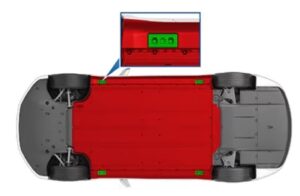
Caution: Make sure that the lifting equipment does not touch the high voltage battery on any other location than on the dedicated lifting points. Lifting the vehicle on other locations than on the indicated lifting points can cause damage to the high voltage battery.
4. Adjust the height and position of the lift arm pads to make sure that they are correctly located.
5. With assistance, raise the lift, making sure that the lift arm pads remain in their correct positions.
Warning: To reduce the risk of personal injury, use appropriate equipment while performing this operation.
Warning: Never raise the vehicle when a charge cable is connected, even if charging is not in progress.
Warning: Do not work on an incorrectly supported vehicle. Doing so can cause serious damage, bodily injury, or death.
Lifting procedure (Model 3/Model Y)
Use the guidelines below to make sure that you are lifting the vehicle safely:
-
Position the vehicle centrally between the lift posts.
-
Position the lifting arm pads under the four vehicle lifting points on the High Voltage (HV) battery as shown (green locations, Figure 2).
DO NOT position the lift arm pads on any other position on the HV battery or side rails (red area, Figure below).
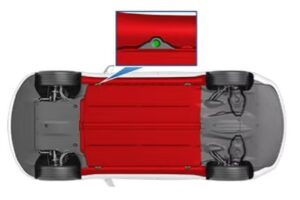
Caution: Make sure that the lifting equipment does not touch the high voltage battery on any other location than on the dedicated lifting points. Lifting the vehicle on other locations than on the indicated lifting points can cause damage to the high voltage battery.
3. Adjust the height and position of the lift arm pads to make sure that they are correctly located.
4. With assistance, raise the lift, making sure that the lift arm pads remain in their correct position.
Warning: To reduce the risk of personal injury, use appropriate equipment while performing this operation.
Warning: Never raise the vehicle when a charge cable is connected, even if charging is not in progress.
Warning: Do not work on an incorrectly supported vehicle. Doing so can cause serious damage, bodily injury, or death.
• Please refer to the official Tesla guide for more information and other guidance for MOTs.